Name Registration
Everyone can register the name using a protocol based on Memos.
First thing you need to do is generate an Ed25519 keypair: its key is what proves you own your names.
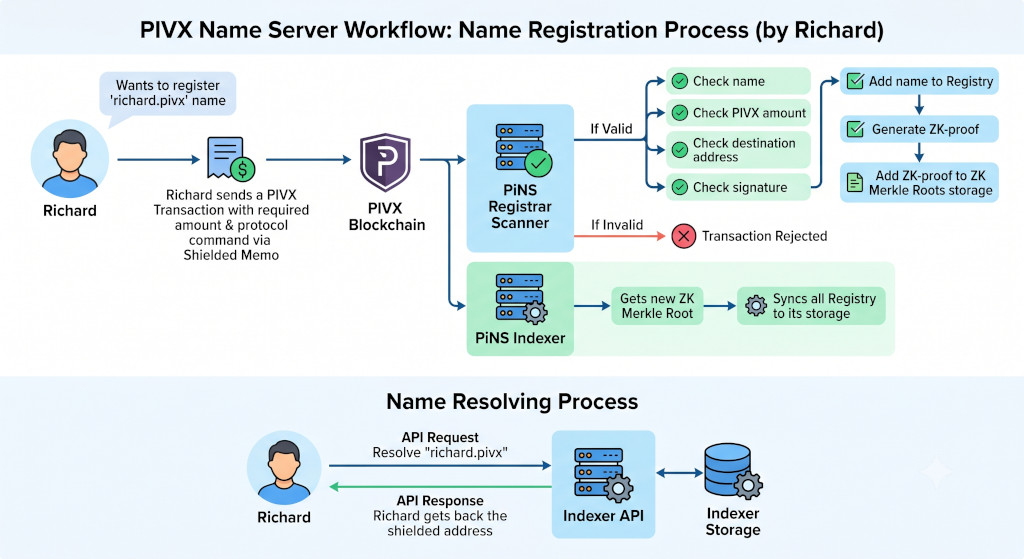
For example, Richard wants to register richard.pivx. The key steps to do that:
- Form a transaction memo according to the PIVX Name Protocol
- Send a Transaction to the PiNS Registrar address with the required amount and memo command signed with your private key
- PiNS Scanner validates: name rules, signature, amount, other protocol checks
- Proof generation to cryptographically prove the registration
- The indexer gets the new proof, scans, validates and builds the distributed name registry
- Done!
richard.pivxis live
The Memo
According to the protocol, the name registration memo has 8 colon-separated fields:
PiNS:1:REG:{name}:{pivx_address}:{ed25519_pubkey}:{nonce}:{signature}
The signature covers PiNS:1:REG:{name}:{pivx_address}:{ed25519_pubkey}:{nonce} — the
whole command without the trailing signature field — using the Ed25519 private key. This
proves Richard authorised the registration, and nobody can register a name on his behalf
without his key.
The target address must be a mainnet PIVX Sapling shielded address (ps…, 78 characters,
in lowercase): the indexer and the zero-knowledge circuit accept nothing else, so a transparent
address cannot be used. Refunds and sale proceeds never go to this address; they are credited
to the internal balance of an Ed25519 key. See Command Format for
the full field rules, nonce semantics and the 512-byte memo budget.
If several persons want to register the same name at the same time, only the first one transaction will be processed and the others will be refunded to the user's internal balance. User can withdraw funds anytime by simple filling out the withdrawal address on the website.